Gemini watermark remover.
Free. In your browser.
Remove supported visible star watermarks from Google Gemini images you own or may edit. Use this free online tool without an account or image upload: choose a file, review the corner, and download a PNG. Uncertain matches keep the original.
Choose an image.
Drop images here
or choose one or more from your device
Opaque, still PNG, JPEG, WebP · 20 MiB each · 10 per batch
256–4096 px per side · 12 MP each · 24 MP / 100 MiB per batch
Visible bottom-right Gemini overlays only. Transparent, animated, resized or cropped images may be skipped. Uncertain detection keeps your original. No SynthID or C2PA removal; no general copyright watermark removal.
Review the corner before you download.
These are corner views from one public, MIT-licensed upstream sample processed by WatermarkLift. Compare the star and the surrounding texture.
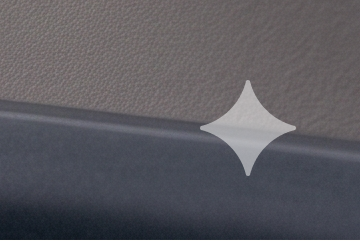
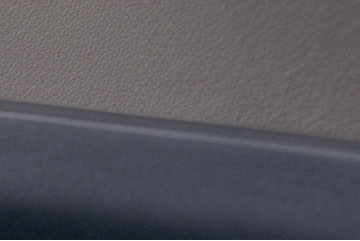
One regression example, not an accuracy benchmark or proof of lossless restoration. Results vary; uncertain matches keep the original. Sample source ↗ · MIT attribution · See all six tested cases, including originals kept
How to remove a Gemini watermark.
Choose an original image
Select a static PNG, JPEG or WebP downloaded from Gemini. Your file stays in this browser; no image is uploaded.
Clean the visible star
Confirm you may edit the image, then choose Clean images. Known overlay templates are checked locally; uncertain results keep the original.
Review & download
Compare before and after, then use Inspect corner at 1:1. If the edit looks right, choose Download PNG. Keep your original too.
Questions,
answered plainly.
Which Gemini watermarks can this clean?
This tool targets known visible sparkle overlays at their original bottom-right positions in opaque still images. It uses known alpha templates and inverse blending to estimate covered pixels, with conservative detection and quality checks. No generative fill or model API is used. Screenshots, re-compressed, resized or cropped images, new overlay designs and complex backgrounds may be skipped. It does not verify that an image came from Gemini.
Can I use this as a Gemini logo remover online?
If you mean the visible star or sparkle in a Gemini image’s bottom-right corner, this is the same supported task. Choose the original file and review the result. WatermarkLift is an independent tool, not a Google product; it does not erase arbitrary logos or verify an image’s source.
Is this Gemini watermark remover free?
Yes. There is no account, payment or image upload. Batch size and image limits protect browser memory; supported images can be processed and downloaded without a paid plan.
Is the result lossless?
No. Inverse blending estimates covered pixels. Compression, rounding and clipped colors can prevent exact restoration. Output is a newly encoded, edited PNG, so file bytes and some source metadata may change or be omitted. Review each result and retain the original.
Where do my images go?
Your images stay in this browser session. There is no image upload endpoint, account, remote model or cloud image storage. Ahrefs and, with your permission, Google Analytics measure visits and fixed tool events; images, filenames, pixels and result explanations are excluded. Read the privacy notice. Clear the batch or close the page to release image references. Downloads stay wherever your browser saves them.
Does it remove SynthID or C2PA?
There is no dedicated SynthID or C2PA removal or verification feature. This tool only targets the visible overlay. Editing and PNG re-encoding may affect invisible signals or omit source metadata, including Content Credentials; their preservation is not guaranteed. Source signatures are not copied or recreated. Original downloads preserve the exact input file. It is not a tool for other copyright watermarks. Understand the different marks and records.
Why was my image left unchanged?
No reliable template match, low confidence, transparent pixels, unsupported format, potential content damage or a processing failure can all keep the original. Each image includes a reason. Skipped images are never included in the cleaned ZIP; their original downloads preserve the exact input bytes.
What has actually been tested?
Automated tests cover synthetic overlays, negative images, transparency, limits and batch lifecycle. Synthetic tests are not proof of real Gemini image quality. A small number of MIT-licensed upstream samples have also been checked. These are finite regression examples, not a general accuracy benchmark. Real-world image quality and all browsers have not been comprehensively validated.
Guides for a careful edit.
Batch Gemini watermark remover ↗
Process multiple images, review mixed results and export only accepted PNGs in a ZIP.
01 / PRACTICAL WALKTHROUGHRemove a Gemini watermark from an image ↗
Follow the buttons from original file to reviewed PNG, with phone downloads and unchanged results explained.
02 / KNOW THE DIFFERENCEVisible star, SynthID & Content Credentials ↗
What each mark means, what this tool targets and why keeping the original matters.